
Version 1.0 · for Macs with Apple Silicon
Where did my
space go?
Mac Deficit shows what is filling your Mac's drive the moment it opens, drawn as an apple, with an account of every gigabyte. Then it helps you clear it safely.
A native Mac app with a Rust core · Apple Silicon · macOS 14 or later · one payment, no subscription

- 8 secondsfor a whole drive of 1.9 million files and folders, on an M3 MacBook
- Rust corethe scanner that reads your drive is written in Rust, under a native SwiftUI app. How it is built
- 0 bytessent anywhere: no account, no analytics, no telemetry
- 1 clickto put back anything you moved to the Trash
The ledger
Every gigabyte,
accounted for.
macOS says your drive is full. Mac Deficit says why.
After a scan of a whole drive, one button shows where all of its used space went: what the scan found, what belongs to macOS itself, and what could not be read, listed place by place. The space macOS frees when it needs room, Time Machine's local snapshots among it, is shown apart.
- Sizes are the space files really take on the drive
- Hard links and copies that share their space are counted once
- Nothing is silently left out: what the app may not read, it names

The Apple Treemap
Your drive,
drawn as an apple.
The apple is your Mac. The cells inside it are the folders and files taking its space.
The bigger the cell, the more it holds. Folders are coloured by the kind of file that fills them, with names wherever they fit. Click a cell to go inside, or work from the sorted list beside it: the two always show the same folder.
- Choose several items in the list or the apple at once
- Move something to the Trash and the other cells hold still
- Every cell and every action is labelled for VoiceOver

Clear space safely
It shows you the size first.
You decide.
Mac Deficit is not a cleaner. It never picks files for you and never removes anything on its own.
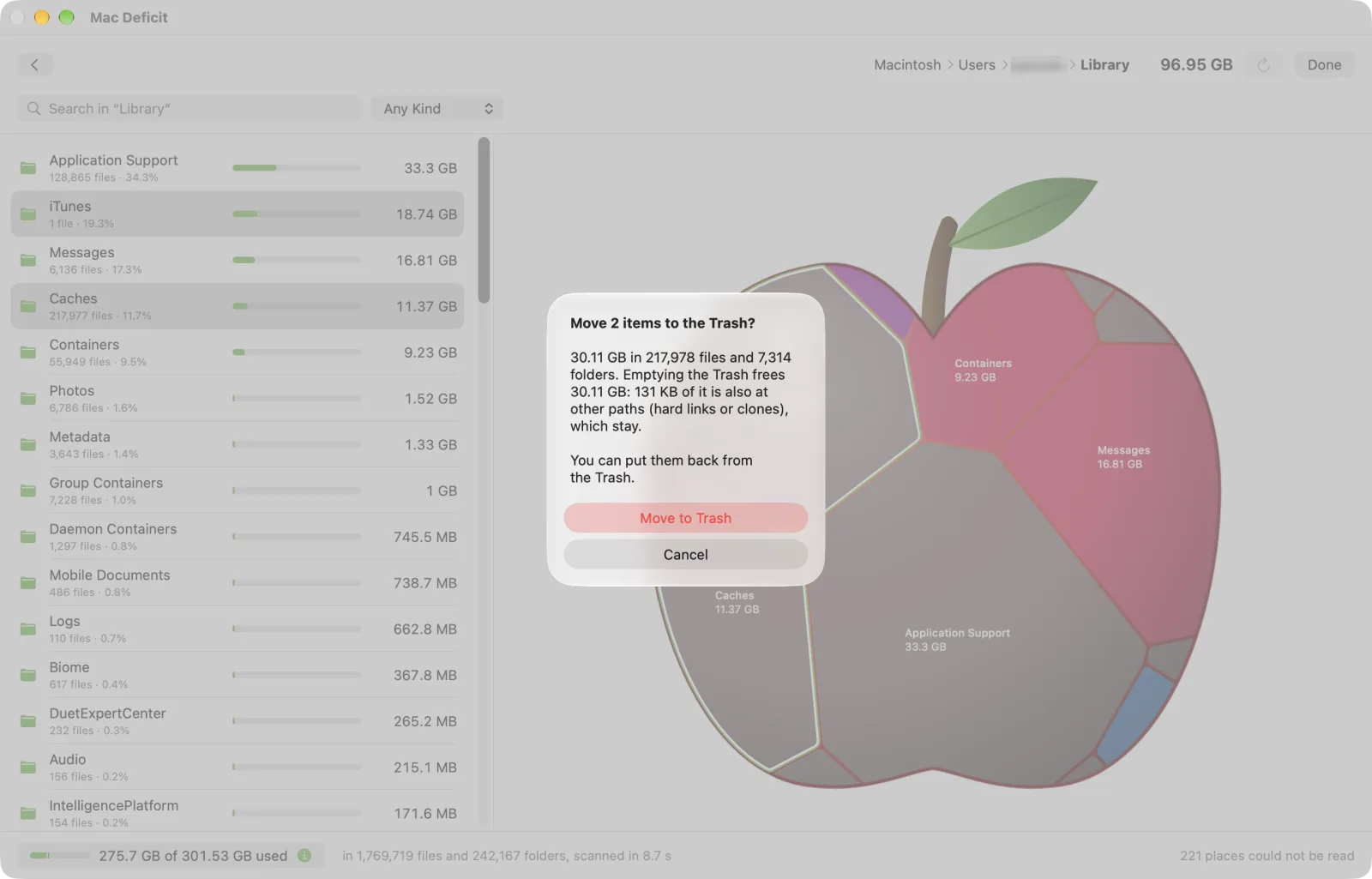
The Trash, with the total first
One confirmation says what will go and how much space it really frees, even when another copy still holds the data. Put it back with one click.
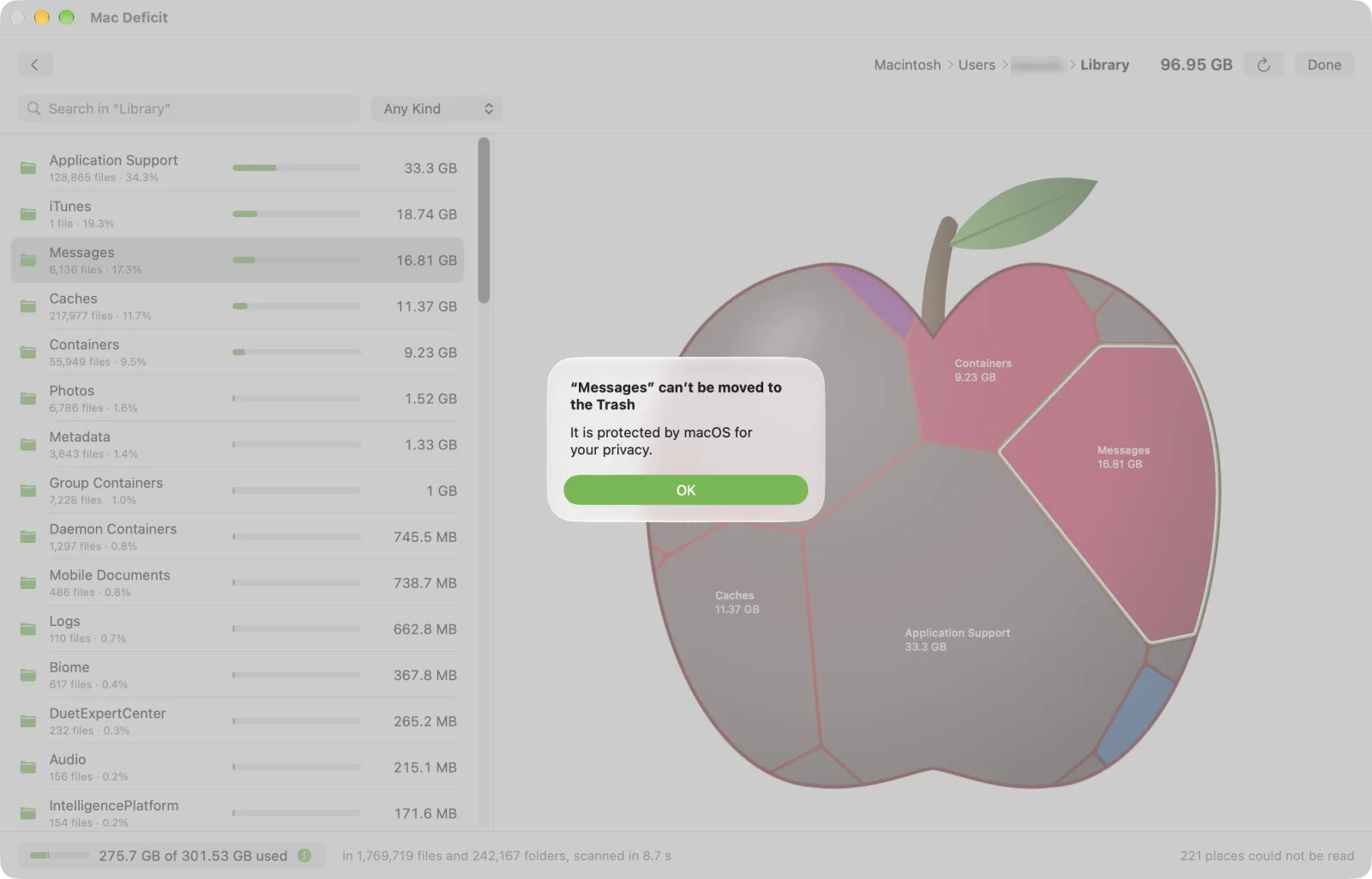
What your Mac needs is never offered
System folders, and the places macOS protects for your privacy, such as Messages, Contacts and the Photos library, cannot be removed here. The app says why.
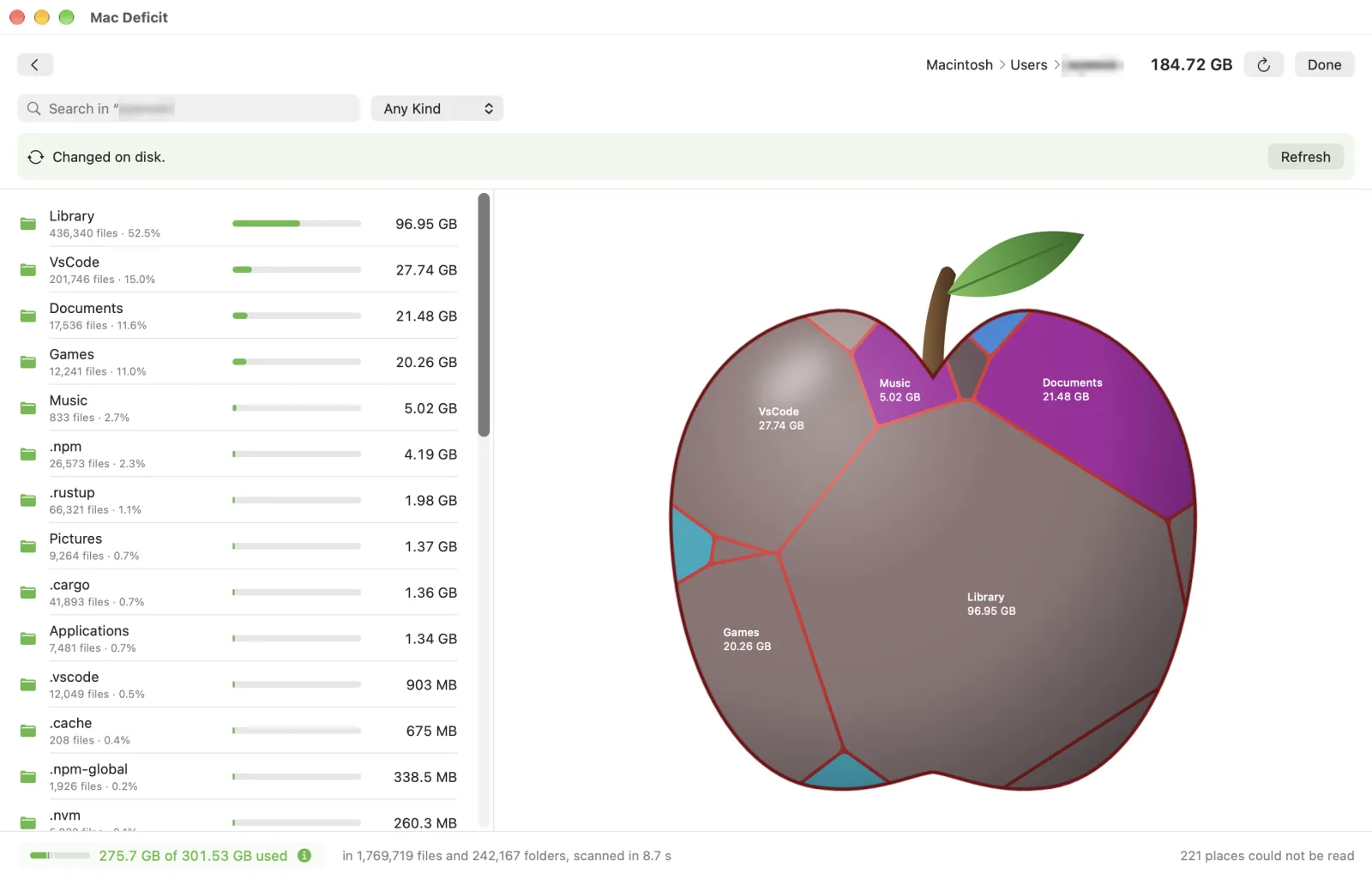
A history, and a view that keeps up
Everything you moved, deleted or put back is kept in a history on your Mac. Change something in Finder and one click on Refresh catches up, without scanning again.
And the rest
Fast, and thorough about it.
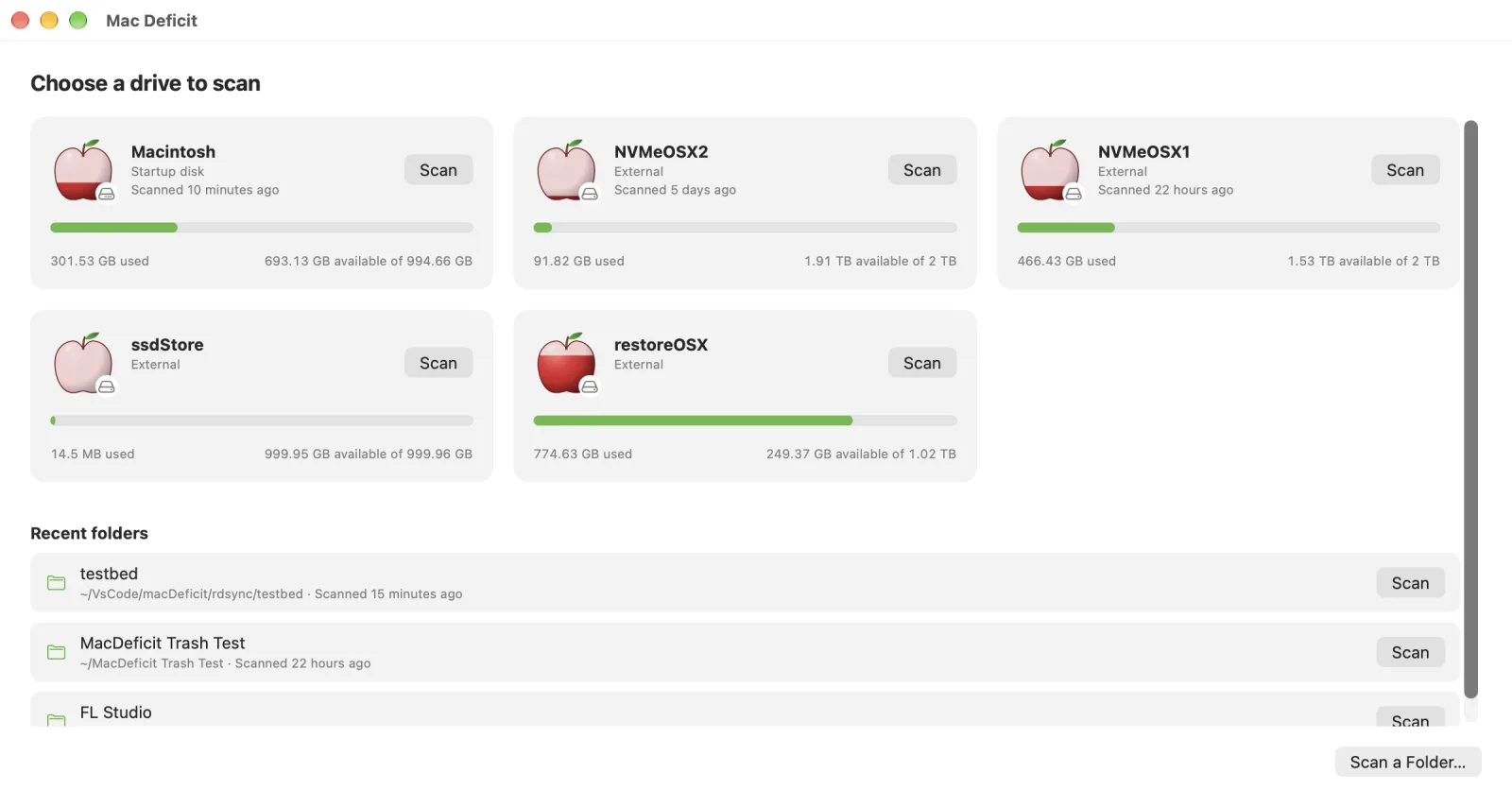
Every drive, at a glance
Each drive is an apple filled as far as it is used. Plug one in or eject it and the list follows. APFS, Mac OS Extended, exFAT and FAT are all measured as Finder measures them.
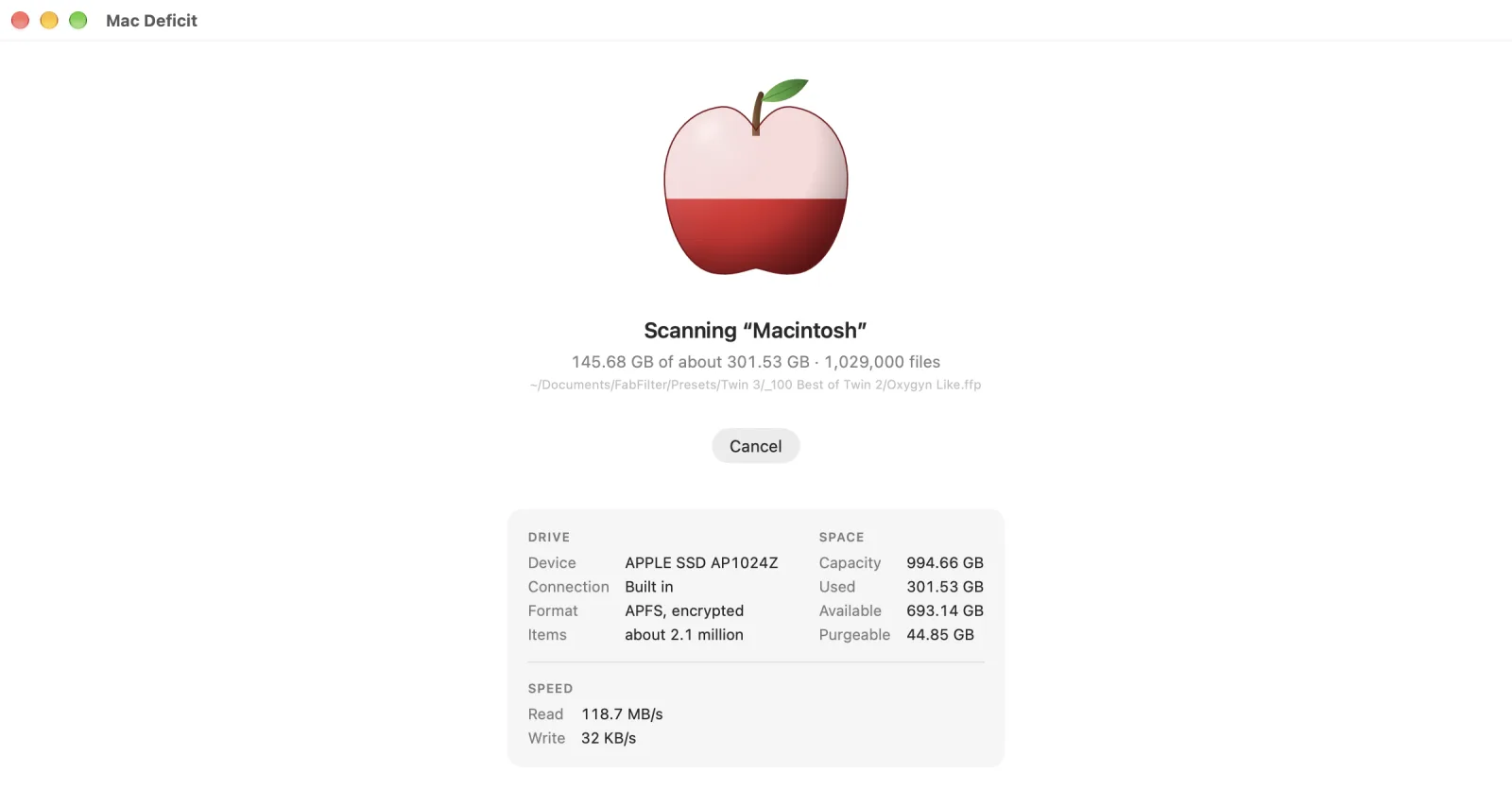
A scan on every core
The scanner, written in Rust, reads the drive on every core while the apple fills, with what the drive is and how fast it is reading. Cancel at any moment; the window stays responsive throughout.
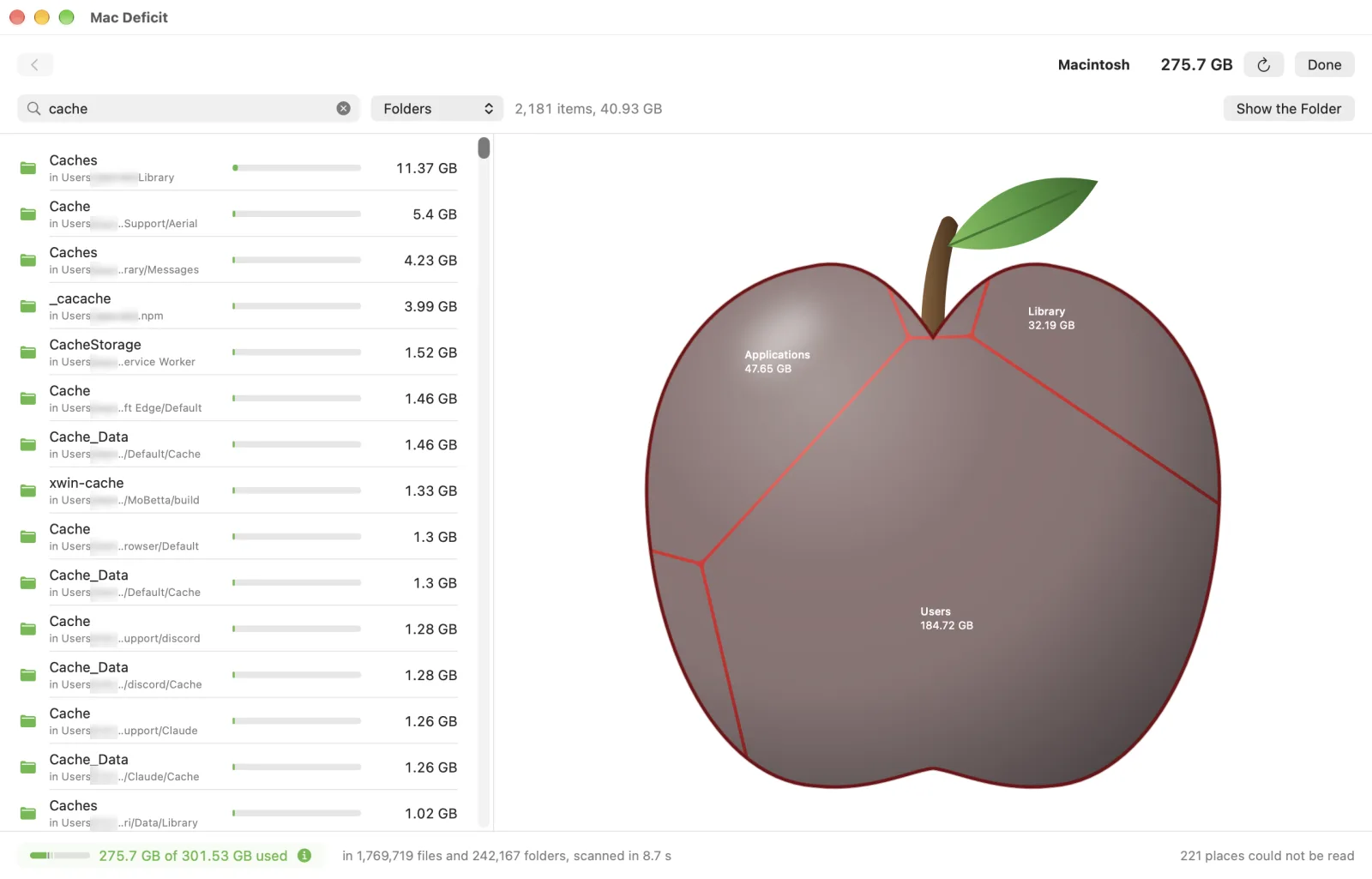
Find anything by name or kind
Type a name and see every match below the folder you are in, largest first, with the space they take together. Or pick a kind to see the largest videos or documents anywhere on the drive.
Under the hood
Rust at its core.
Native on top.
The part that reads your drive is written in Rust. The part you see is written in SwiftUI. Nothing in between is a web page.
The scanner is Mac Deficit's own: a parallel walk in Rust that asks macOS for a folder's entries in batches, with their sizes, through getattrlistbulk, on every core at once. It is how a whole drive is read in seconds. It runs inside the app, in the same process as the interface, so there is no helper to install and nothing left running when you quit.
- A memory-safe language for the code that touches every file you own
- No Electron and no web view: a real Mac app, for Apple Silicon only
- No networking code in the scanner at all
- Scanner
- Rust, 2024 edition
- Interface
- Swift and SwiftUI
- Between them
- UniFFI: Swift calls Rust directly, in one process
- Reading a folder
getattrlistbulk, entries and sizes in batches- Threads
- every core, sharing one stack of folders
- Shared data
- hard links and APFS clones resolved, counted once
- Tests
- 133 in the Rust core, 58 in the app
- Open source inside
- every crate listed in the app, with its licence
Private by design
Nothing leaves your Mac.
A disk analyzer reads the name and size of everything you own. So this one keeps all of it to itself.
-
No account, no tracking
No sign-in, no analytics, no telemetry, no advertising. The app has nothing to send and nowhere to send it.
-
One request, when you ask
Check for Updates reads a version number from this site, only when you choose it from the menu. It sends nothing about you or your Mac.
-
Access asked for, not assumed
The app explains why Full Disk Access helps and opens the right page of System Settings. Without it, it still works and lists what it could not read.
-
Reports that stay yours
If the app ever stops unexpectedly, its report stays on your Mac, names none of your files, and is shown to you before you share it with anyone.
The whole of it, in plain words: the privacy policy.
Get Mac Deficit
One payment. Yours to keep.
No subscription, and no licence code to enter: you buy the app and it is yours.
Personal licence
For you
$3.99launch price
- One person, on every Mac that person uses
- Signed with an Apple Developer ID and notarized by Apple, so it opens like any Mac app
- Every 1.x update included; Check for Updates tells you when one is out
Secure checkout by Polar. The download is yours once you have paid.
Family licence
For your household
$9.99up to three people
- Up to three people in one household, each on the Macs they use
- The same signed, notarized app and the same updates
- One payment for everyone: no accounts, no licence codes
Secure checkout by Polar. Refunds within 14 days: Terms of Sale.
Mac App Store
Through Apple
Soonafter Apple's review
- Bought with your Apple Account and installed from the App Store
- Sandboxed by Apple: you choose once each drive or folder it may read
- Family Sharing: one purchase for up to six people in your family
- Updates arrive through the App Store
Paid for and refunded through Apple.
Needs a Mac with Apple Silicon (M1 or later) and macOS 14 Sonoma or later. Already have it? Get the newest version.
Questions
Before you ask.
Is this a Mac cleaner?
No. Cleaners decide what is junk and remove it for you. Mac Deficit shows you where the space went and what each thing really takes, and leaves every decision to you. It has no "clean" button, installs nothing that runs in the background, and never removes anything on its own.
What is "System Data", and can it show me what is in it?
System Data is the name macOS's Storage panel gives to everything it does not sort into a category: caches, logs, app support files, local snapshots and more. Mac Deficit does not use that label. It scans the folders themselves, so you see what is in your Library and the other places that panel lumps together, with the purgeable space and macOS's own volumes shown apart after a whole-drive scan.
Why does it ask for Full Disk Access?
macOS keeps parts of your home folder, such as Mail and Messages, from any app until you allow it. Without that permission a scan cannot measure them, and the numbers come up short. Mac Deficit asks, explains, and opens the right page of System Settings. If you would rather not, it carries on with limited access and lists what it could not read.
Can it delete something my Mac needs?
It is built not to. Folders macOS or your account depends on, and the places macOS protects for your privacy, are never offered for removal, and the app says why. Everything else goes to the Trash by default, where one click puts it back. Deleting immediately is a separate command in the File menu that shows the size first and makes Cancel the default.
Do the sizes match Finder?
They are the space files really take on the drive, in decimal units as Finder shows them, or binary units if you prefer. Files that share their data, hard links and the copies Finder's Duplicate makes, are counted once, so the total is what removing them would actually free.
What is it built with?
The scanner is written in Rust and the interface in Swift and SwiftUI, joined in one process, so it is a native Mac app from end to end: no Electron, no web view, no background helper. More under the hood.
Does it run on an Intel Mac?
No. Mac Deficit is built for Apple Silicon only (M1 or later), on macOS 14 Sonoma or later.
How do updates work?
Choose Mac Deficit › Check for Updates… and the app says whether a newer version is out. It installs nothing itself: you download the new version from your purchase and replace the app in Applications. How to update.
Who makes it, and where do I get help?
Mac Deficit is made by RawData Studio. For help with the app or a purchase, write to support@macdeficit.com. The roadmap, screenshots and a public place for questions and bug reports are on GitHub.